
Laptops, Acer, Review
Acer Aspire 7 A715-79G Review (2025): Best Gaming Laptop Under ₹70,000?
The Acer Aspire 7 A715-79G review starts with a very important question that every budget-conscious buyer in India asks — can a laptop under ₹70,000 genuinely handle gaming, content creation, and everyday productivity without cutting too many corners? After spending considerable time with this machine, testing it across gaming sessions, video editing projects, college assignments, and daily office work, the answer is a confident yes. The Acer Aspire 7 A715-79G is one of the most thoughtfully specced budget gaming laptops available in India right now, and it deserves far more attention than it gets.
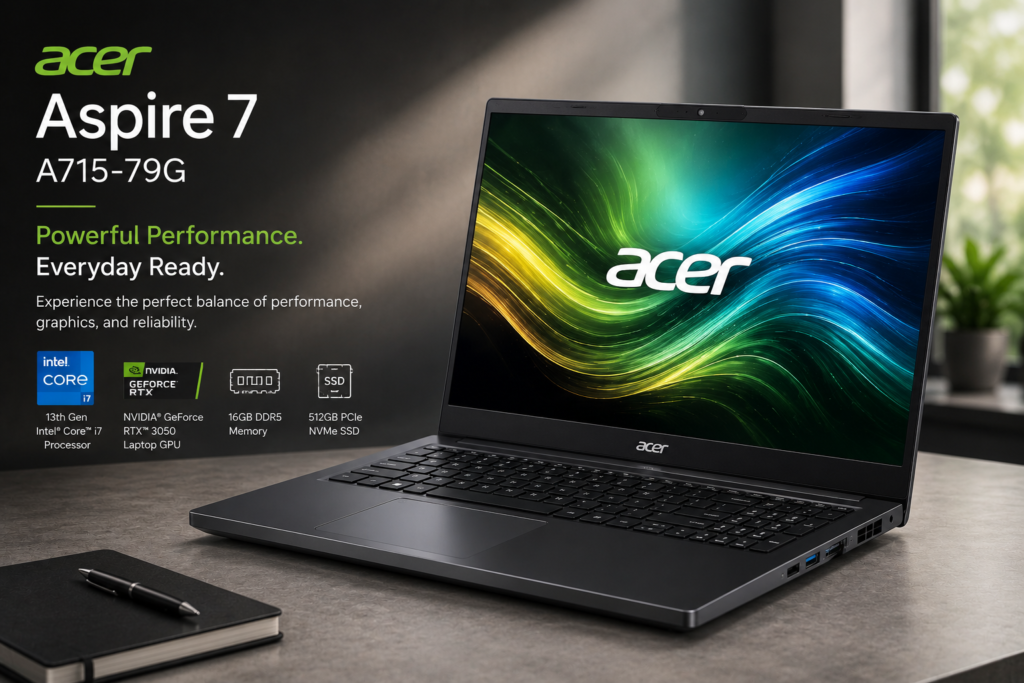
This laptop manages to pack a 13th Gen Intel Core i7 processor, an NVIDIA GeForce RTX 3050 GPU with 6GB VRAM, a 15.6-inch 144Hz Full HD IPS display, 16GB DDR5 RAM, a 512GB PCIe NVMe SSD, Wi-Fi 6, Ethernet, HDMI 2.1, and a full-size backlit keyboard with a numeric pad — all in a sleek 1.99kg chassis that looks nothing like a typical gaming laptop. Whether you are a college student, a working professional who also likes to game on the side, or a content creator on a budget, the Aspire 7 A715-79G has been designed with you in mind.

Acer Aspire 7 A715-79G Design & Build Quality
The moment you pick up the Acer Aspire 7 A715-79G, two things stand out immediately — how light it is, and how premium it feels for its price. The laptop weighs just 1.99kg and measures a slim 22.7mm in thickness, which is remarkable for a machine carrying dedicated graphics. Most gaming laptops at this price range feel chunky and heavy — the Aspire 7 bucks that trend entirely.
The chassis is built from an aluminium-alloy material finished in Acer’s signature Shadow Black colour — dark, matte, and professional-looking. There is no aggressive gamer aesthetic here, no RGB strips on the lid, no sharp angles trying too hard to look intimidating. Instead, the Aspire 7 looks like a serious work machine with gaming capability under the hood. This makes it one of the few gaming laptops you can genuinely carry to a college lecture, a client meeting, or a coffee shop without looking out of place.
Structural rigidity is impressive. The lid has minimal flex when you apply pressure from the back, the base does not creak under heavy typing, and the hinge mechanism feels smooth and precisely engineered. It opens with one hand — something not all laptops manage — and holds its angle firmly without wobbling. The bottom panel has a series of ventilation grilles that allow air to flow into the dual-fan cooling system, and rubber feet keep the laptop planted on a desk even during intense typing sessions.
One design detail that deserves specific praise is the fingerprint reader embedded in the power button. It is fast, accurate, and makes Windows Hello login effortless — no more typing passwords every time you open the lid. It works consistently even if your fingers are slightly warm or slightly cold. At this price point, having a fingerprint reader at all is a bonus — having it work this well is a genuine advantage.

Port selection on the Acer Aspire 7 A715-79G is one of its strongest selling points and genuinely sets it apart from competitors at this price. On the left side you get a Kensington Lock slot for physical security, a RJ-45 Ethernet port for wired internet, an HDMI 2.1 port for connecting 4K monitors or TVs, a USB 3.2 Gen 1 Type-A port, and a USB 3.2 Gen 2 Type-C port. On the right side you find a headset combo jack, another USB 3.2 Gen 1 Type-A port, status indicator LEDs, and the DC-in charging port.
The inclusion of a dedicated RJ-45 Ethernet port is a big deal for gamers. Wired connections offer lower latency, more stable speeds, and no packet loss compared to Wi-Fi — and in competitive online games like Valorant, CS2, or FIFA, every millisecond matters. Most thin gaming laptops at this price drop the Ethernet port to save space. Acer keeps it here, and that decision alone makes the Aspire 7 a better buy for serious online gamers. The HDMI 2.1 supports up to 4K at 120Hz on external monitors, making the laptop excellent as a portable workstation when connected to a large screen at home.
Keyboard & Touchpad — Designed for Comfort and Productivity

The keyboard on the Acer Aspire 7 A715-79G is one of the most underrated features of this entire package. It is a full-size backlit keyboard with a dedicated numeric keypad — something most competing gaming laptops at this price category drop entirely to keep the chassis slim. Acer manages to include it without making the layout feel cramped or the keys feel small.
Key travel depth is generous — more than what you find on most ultrabooks and even some gaming laptops costing significantly more. The actuation force is consistent across all keys, and the feedback is satisfying without being overly clicky. Typing long documents, writing code, or entering data in spreadsheets for extended sessions never feels tiring. The backlight is single-colour white but is well-distributed — it illuminates the key legends clearly without bleeding through at the sides, making late-night work and gaming sessions comfortable.
The dedicated numeric keypad is a standout addition that many buyers overlook until they actually need it. Finance students, data analysts, accountants, and anyone who works frequently with numbers will find this invaluable. It is also useful in games that use numpad shortcuts. For a laptop that markets itself to students and professionals as much as to gamers, this is exactly the right design choice.
The precision touchpad is large, well-positioned, and smooth. It supports all standard Windows multi-touch gestures — two-finger scrolling, three-finger app switching, four-finger desktop switching — and they all register accurately without false touches. The touchpad surface has a pleasant matte texture that prevents your finger from sticking even during long use. For productivity work, it is more than adequate as a mouse replacement.
Display — 15.6-inch FHD IPS 144Hz Panel
The Acer Aspire 7 A715-79G features a 15.6-inch Full HD IPS display with a native resolution of 1920×1080 pixels and a 144Hz refresh rate. This combination is the sweet spot for gaming at this price — the FHD resolution is perfect for the RTX 3050/2050 GPU to push high frame rates, and the 144Hz refresh rate means you can actually see and feel the benefit of those extra frames.
To understand why 144Hz matters, consider this — the human eye can detect the difference between 60fps and 120fps gaming very clearly. Fast-moving objects look sharper, cursor movement feels more responsive, and the overall gaming experience feels more connected and immediate. In competitive games like Valorant, CS2, or Apex Legends, a 144Hz display gives you a genuine advantage — enemy players appear less blurry during fast movement, making them easier to track and aim at. The RTX 3050 in this laptop can consistently push above 100fps in these titles at high settings, which means the 144Hz panel is being properly utilised.
The IPS panel technology delivers wide viewing angles — colours remain accurate and brightness stays consistent even when you are viewing the screen from the side at a steep angle. This is particularly useful when showing someone content on your screen or using the laptop in a group setting. Colour reproduction is good for an entry-level gaming display — sRGB coverage is adequate for casual photo editing and social media content creation.
The display uses a matte anti-glare coating that significantly reduces reflections from windows and overhead lights. Unlike glossy screens that constantly show you your own reflection in bright environments, the Aspire 7’s matte panel stays readable and comfortable in well-lit rooms, offices, and even near windows. Brightness is adequate for indoor use — not the brightest panel on the market, but the anti-glare coating compensates well.
For content creators using this laptop for video editing in Premiere Pro or DaVinci Resolve, the FHD resolution provides enough screen real estate for a comfortable editing timeline, and the colour accuracy is sufficient for social media-grade content. For professional colour-critical work, an external monitor would be recommended — but for YouTube, Instagram Reels, and general content creation, the built-in display handles everything well.
Performance — Intel Core i7 13th Gen + NVIDIA RTX 3050

Performance is the heart of any laptop review, and the Acer Aspire 7 A715-79G has a lot to offer here. The top-end configuration pairs a 13th Gen Intel Core i7 processor with an NVIDIA GeForce RTX 3050 with 6GB GDDR6 VRAM. Below that sit configurations with the Intel Core i5 13420H paired with either the RTX 3050 (6GB) or RTX 2050 (4GB) — all capable options depending on your budget and workload requirements.
The 13th Gen Intel Core i7 is built on Intel’s hybrid architecture with Performance cores and Efficiency cores working together. It handles simultaneous multi-tasking — having 30+ browser tabs open alongside Spotify, Discord, and a game running in the background — without any slowdown. Geekbench 6 multi-core scores for this processor class consistently land above 10,000, placing it firmly among the fastest laptop CPUs in this price range. Single-core performance is also excellent, which directly benefits games since most titles are still primarily single-thread dependent.
The NVIDIA GeForce RTX 3050 with 6GB VRAM is a capable entry-level dedicated GPU that handles 1080p gaming across a wide range of titles. Here is what to expect in real-world gaming at 1080p on this laptop:
- Valorant: 150–200fps on High settings — fully utilises the 144Hz display
- CS2: 120–160fps on High settings — smooth and competitive
- GTA V: 80–100fps on High settings — very playable
- FIFA / EA FC: 100fps+ on High settings — excellent experience
- Fortnite: 80–100fps on High settings — smooth gameplay
- Cyberpunk 2077: 40–50fps on Medium settings — playable with some tweaking
- RDR2: 45–55fps on Medium settings — comfortable gaming experience
- Minecraft: 200fps+ — extremely smooth on Java edition
For most popular titles that Indian gamers play — BGMI, Valorant, CS2, GTA V, FIFA — the RTX 3050 delivers a consistently smooth and enjoyable experience at high settings. The 6GB VRAM is a meaningful advantage over the 4GB RTX 2050 — newer games frequently require more than 4GB VRAM at high texture settings, and having 6GB gives this laptop a longer useful lifespan before it starts struggling with upcoming titles.
The 16GB DDR5 RAM is another advantage over DDR4 competitors in the same price range. DDR5 offers higher memory bandwidth which benefits both gaming and creative workloads. Apps load faster, large files open quicker, and the system feels snappier overall. The RAM is upgradeable via SODIMM slots — you can go up to 32GB if your workload demands it in the future.
The 512GB PCIe NVMe SSD provides fast storage performance. Windows 11 boots in under 15 seconds, large games like GTA V load in well under a minute, and file transfers are quick. 512GB fills up faster than you expect with a growing game library — an additional M.2 SSD slot is available for expansion, or you can use an external SSD via the USB 3.2 Type-C port.
Thermal Performance and Cooling System
Acer has equipped the Aspire 7 A715-79G with a dual-fan cooling system with dedicated heat pipes for the CPU and GPU. Under moderate workloads — browsing, office work, streaming — the fans remain quiet and the laptop stays comfortably cool. Under sustained gaming load, fan noise becomes noticeable — this is expected and normal for any thin gaming laptop pushing this level of performance. CPU and GPU temperatures stay within safe operational limits during extended gaming sessions, thanks to the effective thermal design.
One important real-world tip: always plug in the charger before gaming. On battery power, Windows and the GPU driver automatically reduce the GPU’s power limit to preserve battery life, which can result in noticeably lower frame rates. Plugging in the charger unlocks full GPU performance and delivers the best gaming experience. This behaviour is standard across all gaming laptops, not specific to the Aspire 7.
Battery Life — Real World Usage
The Acer Aspire 7 A715-79G is powered by a 4-cell 58.75Wh lithium-ion battery. Battery life is the one area where this laptop makes an honest compromise for its price and performance level. In real-world mixed usage — web browsing, watching YouTube, writing documents, and light productivity tasks with the display at 60Hz and battery saver mode enabled — most users report around 4 to 5 hours of usage before needing to charge.
With the display at 144Hz and performance mode enabled, that battery life drops to around 2.5 to 3 hours. During active gaming, you can expect approximately 1.5 to 2 hours — which is why gaming with the charger plugged in is always recommended. These numbers are completely typical and expected for a gaming laptop at this price and weight — the RTX 3050 GPU consumes significant power when active, and the 58.75Wh battery capacity simply cannot sustain full GPU performance for extended unplugged sessions.
For students who carry the laptop between classes, the battery is adequate for a morning of lectures if you keep the display at 60Hz and avoid gaming. The charger is relatively compact and easy to carry. If battery life is your absolute top priority over gaming performance, this laptop is not the best choice — but for anyone who primarily uses the laptop plugged in at a desk or gaming setup, the battery limitation is barely noticeable in practice.
Connectivity — Wi-Fi 6, Ethernet, Bluetooth 5.2
Wireless connectivity is handled by Intel Wi-Fi 6 (802.11ax) — the latest Wi-Fi standard that delivers significantly faster speeds, lower latency, and better performance in congested network environments compared to Wi-Fi 5. If your router supports Wi-Fi 6, you will notice meaningfully better gaming ping and download speeds on this laptop compared to older Wi-Fi 5 machines. Bluetooth 5.2 handles wireless peripherals like earphones, controllers, and mice efficiently with stable connections and low audio latency.
The dedicated RJ-45 Gigabit Ethernet port is a feature that serious gamers and IT professionals will immediately appreciate. Wired Ethernet provides the most stable possible internet connection — no interference, no signal drops, consistent latency. For online gaming, this translates to noticeably smoother gameplay and fewer connection-related issues compared to Wi-Fi. For remote work involving large file transfers, a wired connection is significantly faster and more reliable. The fact that Acer includes Ethernet on a 1.99kg laptop at this price is genuinely commendable.
Acer Aspire 7 A715-79G Full Specifications
| Specification | Details |
| Model | Acer Aspire 7 A715-79G |
| Display | 15.6″ FHD IPS, 1920×1080, 144Hz, matte anti-glare |
| Processor (Top) | 13th Gen Intel Core i7 (up to 5.0GHz) |
| Processor (Base) | 13th Gen Intel Core i5-13420H (up to 4.6GHz) |
| GPU Options | NVIDIA GeForce RTX 3050 (6GB GDDR6) / RTX 2050 (4GB) |
| RAM | 16GB DDR5 (upgradeable via SODIMM slots) |
| Storage | 512GB PCIe NVMe SSD (additional M.2 slot available) |
| Battery | 4-cell 58.75Wh, ~4–5 hrs productivity, ~1.5–2 hrs gaming |
| Ports (Left) | Kensington Lock, RJ-45 Ethernet, HDMI 2.1, USB 3.2 Gen1, USB 3.2 Gen2 Type-C |
| Ports (Right) | Headset Combo Jack, USB 3.2 Gen1, DC-in Jack |
| Wireless | Intel Wi-Fi 6 (802.11ax), Bluetooth 5.2 |
| Keyboard | Full-size backlit keyboard with dedicated numeric pad |
| Security | Fingerprint reader (in power button), Kensington Lock |
| Webcam | 720p HD webcam with built-in microphone |
| OS | Windows 11 Home |
| Dimensions | 359.5 × 238 × 22.7mm |
| Weight | 1.99 kg |
| Colour | Shadow Black |
| Warranty | 1 Year on-site warranty (India) |
| Price in India | ₹52,990 – ₹79,990 (varies by variant) |
Pros & Cons
|
✅ Pros
|
❌ Cons
|
Who Should Buy the Acer Aspire 7 A715-79G?
Buy this laptop if you are a college student who needs a machine that handles assignments, projects, and presentations during the day, and gaming in the evening. The light weight makes it easy to carry in a backpack, the full-size keyboard makes typing comfortable, and the RTX 3050 gives you genuine gaming capability that no integrated graphics laptop can match.
Buy this laptop if you are a content creator on a budget who edits YouTube videos, creates Instagram Reels, or works in Premiere Pro and DaVinci Resolve. The Core i7 + RTX 3050 combination accelerates video exports significantly over integrated graphics machines, and the 16GB DDR5 RAM handles large project files without struggling.
Buy this laptop if you are a casual to moderate gamer who enjoys popular Indian gaming titles like BGMI, Valorant, CS2, GTA V, FIFA, and Minecraft. The 144Hz display and RTX 3050 together deliver a genuinely satisfying gaming experience in all of these titles without requiring any expensive upgrades.
Do not buy this laptop if battery life away from a power outlet is your primary concern, or if you need to run the very latest AAA titles at ultra settings. For maximum battery life, look at ultrabooks. For cutting-edge gaming performance, the Lenovo Legion 5i Gen 10 or ASUS TUF series offer more powerful GPUs at a higher price.
Final Verdict — Is the Acer Aspire 7 A715-79G Worth Buying in 2025?
The Acer Aspire 7 A715-79G is one of the most complete and well-rounded gaming laptops available in India under ₹70,000 right now. It successfully balances portability, performance, display quality, build quality, and connectivity in a way that very few competing laptops manage at this price point. The slim 1.99kg chassis, the 144Hz IPS display, the full-size keyboard with numeric pad, the dedicated Ethernet port, HDMI 2.1, Wi-Fi 6, fingerprint reader, and the RTX 3050 GPU form a package that is genuinely difficult to fault at this price.
The only meaningful compromise is battery life — but this is an expected trade-off for any gaming laptop with dedicated graphics at this price. For students, office workers who game, and budget content creators who primarily use their laptop plugged in or are comfortable carrying a charger, the Aspire 7 A715-79G offers extraordinary value. It is one of those laptops that makes you wonder why anyone would spend more.
Our Rating
8.5 / 10
Best value gaming laptop under ₹70,000 in India
🛒 Buy Acer Aspire 7 A715-79G on Amazon
Also check official specs at Acer India Official Website
Affiliate Disclosure: This post contains affiliate links. If you purchase through these links, we may earn a small commission at no extra cost to you.
Content Disclosure: This content was produced with AI assistance and human review to ensure accuracy, fairness, and helpfulness for our readers.
Leave a Reply