
LAPTOPS | Review | 2026
- HP Chromebook 14 Review 2026: MediaTek Kompanio 540, Price & Specs
- HP Chromebook 14 Design — Lightweight, Minimal Build
- Display — 14-inch HD Anti-Glare Panel
- Performance — MediaTek Kompanio 540 Chipset
- Keyboard & Connectivity
- Battery Life — Up to 17.5 Hours Claimed
- HP Chromebook 14 Full Specifications
- Pros & Cons
- Who Should Buy the HP Chromebook 14?
- Final Verdict — Is the HP Chromebook 14 Worth Buying?
HP Chromebook 14 Review 2026: MediaTek Kompanio 540, Price & Specs
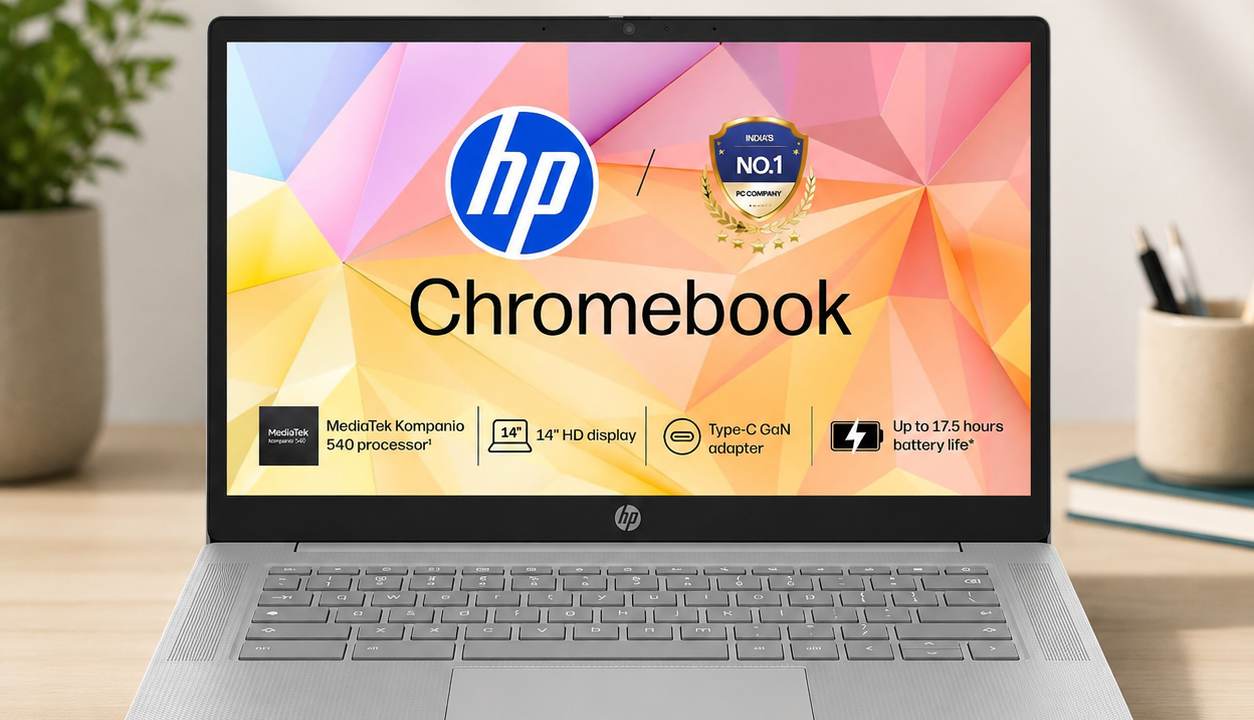
The HP Chromebook 14 (nm0004MU) brings ChromeOS to the budget segment with a MediaTek Kompanio 540 processor, 4GB of LPDDR5 RAM, and 128GB of UFS storage. Aimed at students, casual users, and anyone who lives primarily in a browser, this Chromebook is priced to compete against entry-level Windows laptops while promising a simpler, more secure computing experience.
Key highlights of the HP Chromebook 14 include a 14-inch HD anti-glare display, a lightweight 1.35kg Modern Gray chassis, and a bundled 100GB Google One subscription for one year. According to the manufacturer, the octa-core Kompanio 540 chip is designed specifically for ChromeOS multitasking, offering a fanless and silent computing experience.
Chromebooks occupy a unique space in the Indian laptop market — they are not meant to replace a full Windows or macOS machine, but rather serve as a fast, low-maintenance secondary device or a first laptop for students. This review looks at where the HP Chromebook 14 fits into that picture, based on official specifications.
With ChromeOS handling automatic updates and built-in security layers in the background, the appeal of this device lies largely in simplicity. The sections below cover design, display, performance, keyboard and connectivity, and battery life in detail.

HP Chromebook 14 Design — Lightweight, Minimal Build
The HP Chromebook 14 weighs 1.35kg and comes in a Modern Gray finish with a textured, micro-edge design language, according to official specifications. The build favours portability over premium materials, which is typical for Chromebooks positioned at this price point.
Based on official specifications, the chassis features a clean top lid with a Chromebook badge and HP logo, while the bottom edge houses ventilation and speaker grilles. The overall footprint is compact enough for students to carry in a backpack alongside books and other daily essentials.
HP has also included a spill-resistant keyboard on this model, which the company states is designed to protect internal components from minor liquid spills — a practical addition for students and anyone working near drinks or in shared spaces.
The port selection includes USB Type-C for charging and data, along with the essentials expected on a budget Chromebook. According to the manufacturer, the slim profile does not compromise on port accessibility, keeping day-to-day use straightforward.

Display — 14-inch HD Anti-Glare Panel
The HP Chromebook 14 features a 14-inch (35.6cm) HD display with an anti-glare, micro-edge finish, according to official specifications. This resolution and panel type is standard for Chromebooks in this price bracket, prioritising everyday readability over sharpness for media-heavy tasks.
The anti-glare coating should help reduce reflections in well-lit rooms or near windows, which is a practical consideration for students working in classrooms or shared study spaces. On paper, this makes the display more usable in varied indoor lighting conditions compared to a glossy panel.
The micro-edge bezel design also helps maximise the visible screen area relative to the overall chassis size, based on official specifications. This should make the 14-inch panel feel slightly larger in daily use than the raw dimensions might suggest.
As with most Chromebooks in this segment, the display is tuned primarily for productivity tasks such as browsing, document editing, and video calls rather than colour-accurate creative work or high-resolution video playback.
Performance — MediaTek Kompanio 540 Chipset
The HP Chromebook 14 is powered by the MediaTek Kompanio 540, an octa-core ARM chipset built around two Cortex-A78 performance cores and six Cortex-A55 efficiency cores, paired with 4GB of LPDDR5 RAM. According to the manufacturer, this configuration is designed specifically for smooth ChromeOS multitasking rather than heavy computational workloads.

Storage on this variant is 128GB of UFS, which is noticeably faster than the eMMC storage found on many budget Chromebooks, according to official specifications. This should translate to quicker app launches and faster file transfers compared to older Chromebook generations.
The company also includes a complimentary 100GB Google One subscription for one year, which extends cloud storage well beyond the onboard 128GB. This is a meaningful addition for students who rely on Google Drive for assignments, photos, and backups.
Expected performance should comfortably handle browser-based tasks such as multiple Chrome tabs, Google Workspace apps, video conferencing, and streaming, based on the hardware configuration. The Kompanio 540 is not designed for demanding Android gaming or heavy Linux development workloads.
MediaTek states the Kompanio 540 also supports fanless operation, which means the HP Chromebook 14 should run silently under typical daily use without active cooling noise, based on official specifications from the chipset maker.
Keyboard & Connectivity
The HP Chromebook 14 includes a full-size, spill-resistant keyboard designed for comfortable all-day typing, according to official specifications. HP states the key layout follows standard Chromebook conventions, including dedicated ChromeOS shortcut keys in place of a traditional function row.
A large, responsive touchpad is included below the keyboard, supporting multi-touch gestures for scrolling, switching tabs, and navigating ChromeOS. Based on official specifications, this is designed to reduce reliance on an external mouse for everyday navigation.
On the camera front, the device includes an HD webcam with a physical shutter, according to the manufacturer, which allows users to physically block the camera lens for privacy when it is not in use.
The laptop runs ChromeOS, which comes with built-in access to Google Play apps, automatic background updates, and multiple layers of security, according to official specifications. This should minimise the maintenance overhead typically associated with traditional operating systems.
Battery Life — Up to 17.5 Hours Claimed
HP claims up to 17.5 hours of battery life on the Chromebook 14, tested internally using Google’s power_LoadTest benchmark, according to official specifications. This is a strong figure on paper, reflecting the power efficiency benefits of the ARM-based Kompanio 540 chipset.
On paper, this battery life should comfortably cover a full day of classes or work without needing a charger, provided usage is centred around browsing, documents, and video calls rather than continuous video playback or gaming. As with all manufacturer-claimed figures, actual battery life will vary depending on screen brightness, Wi-Fi usage, and background app activity.
HP Chromebook 14 Full Specifications
| Specification | Details |
| Display | 14″ (35.6cm) HD, anti-glare, micro-edge |
| Processor | MediaTek Kompanio 540, Octa-core |
| RAM / Storage | 4GB LPDDR5 RAM + 128GB UFS Storage |
| Operating System | ChromeOS |
| Extras | 100GB Google One subscription (1 year) |
| Camera | HD camera with physical shutter |
| Keyboard | Full-size, spill-resistant, backlit |
| Battery Life | Up to 17.5 hours (claimed, HP internal testing) |
| Weight | 1.35 kg |
| Colour / Model | Modern Gray, 14a-nm0004MU |
Pros & Cons
|
✅ Pros
|
❌ Cons
|
Who Should Buy the HP Chromebook 14?
Students who need a lightweight, affordable device primarily for browsing, Google Docs, online classes, and video calls should find the HP Chromebook 14 well-suited to their needs. The long claimed battery life and simple ChromeOS interface make it a low-maintenance option for daily academic use.
Users who want a secondary, always-on device for quick tasks like email, note-taking, and video streaming will also benefit from the fanless design and fast boot times associated with ChromeOS devices in general.
Buyers looking for a primary work laptop with heavy multitasking, creative software, or offline application support should consider a full Windows or macOS laptop instead, since 4GB of RAM and ChromeOS naturally limit what this device can handle. Those comparing premium alternatives can check the detailed MSI Prestige 14 AI Evo vs MacBook Pro 14 M3 Pro comparison for a different class of laptop entirely.
Overall, the HP Chromebook 14 fits best as a budget-friendly, education-focused laptop rather than a do-everything machine, and buyers should set their expectations accordingly before purchasing.
📄 Also Read: MSI Prestige 14 AI Evo vs MacBook Pro 14 M3 Pro (2026) — For buyers comparing premium laptops instead of a Chromebook.
Final Verdict — Is the HP Chromebook 14 Worth Buying?
The HP Chromebook 14 delivers a well-rounded package for its intended audience — students and light users who need a fast, secure, and portable device for browser-based tasks. Based on official specifications, the combination of fast UFS storage, claimed all-day battery life, and a bundled Google One subscription adds solid value at this price point.
Buyers should go in with realistic expectations around the 4GB RAM ceiling and ChromeOS’s app limitations compared to a full desktop operating system. For its core use case, however, this Chromebook is a reasonable pick for education and everyday browsing needs.
Our Rating
7.5 / 10
A solid budget Chromebook for students, limited by 4GB RAM
🛒 Buy HP Chromebook 14 on Amazon
Also check official specs at HP India Official Website
Affiliate Disclosure: This post contains affiliate links. If you purchase through these links, we may earn a small commission at no extra cost to you.
Content Disclosure: This content was produced with AI assistance and human review to ensure accuracy, fairness, and helpfulness for our readers.