
- ASUS Chromebook CX15 Review 2026: Best Budget Laptop for Students in India
- ASUS Chromebook CX15 Design — Sustainable and Lightweight
- Display — 15.6-inch FHD Anti-Glare with 87% Screen-to-Body Ratio
- Performance — Intel Celeron N4500 with 8GB LPDDR4X RAM
- Keyboard, Connectivity & Security
- Battery Life — 42WHrs All-Day Battery with 45W Type-C Charging
- ASUS Chromebook CX15 Full Specifications
- Pros & Cons
- Who Should Buy the ASUS Chromebook CX15?
- Final Verdict — Is the ASUS Chromebook CX15 Worth Buying?
Laptops | Review | 2026
ASUS Chromebook CX15 Review 2026: Best Budget Laptop for Students in India
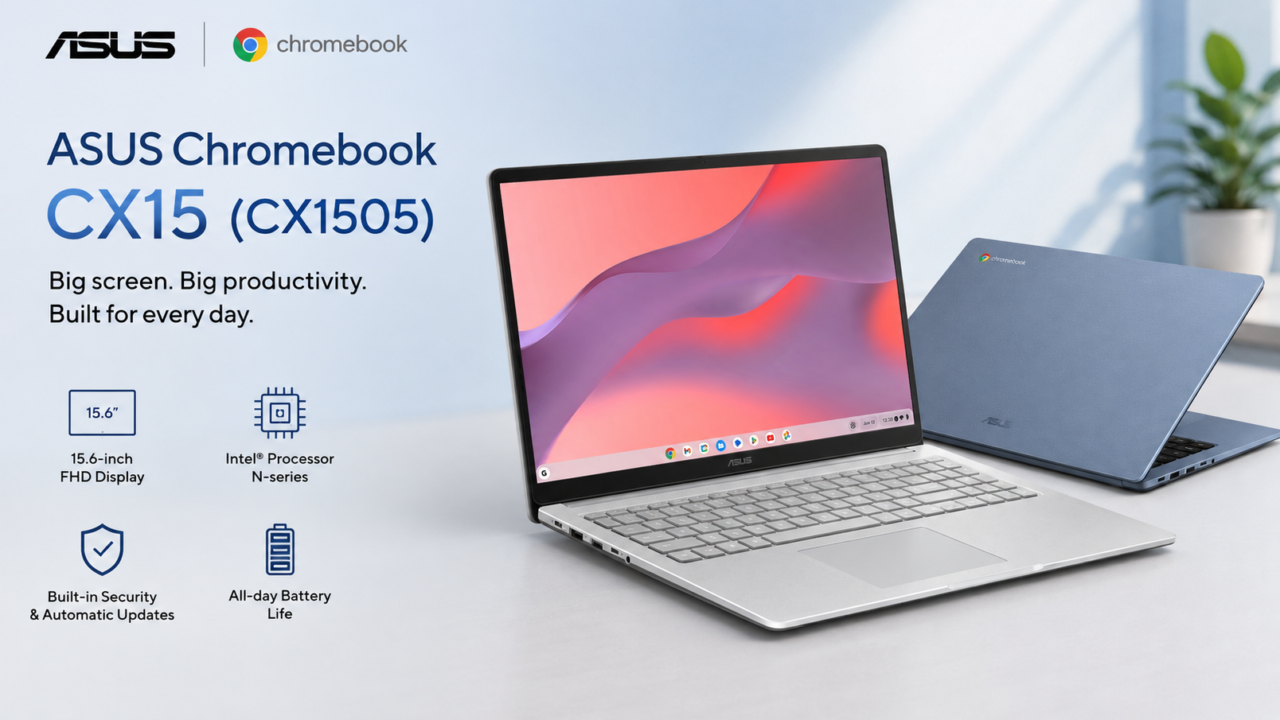
The ASUS Chromebook CX15 (CX1505) arrives in India in 2026 as a budget-friendly productivity laptop that promises big-screen computing without the big price tag. Featuring a 15.6-inch FHD anti-glare display, an Intel Celeron N4500 processor, 8GB LPDDR4X RAM, and 128GB eMMC storage, this ChromeOS-powered machine is positioned as an ideal companion for students, remote workers, and everyday users who need a reliable device for web-based tasks.
According to the manufacturer, the Chromebook CX15 combines a spacious display with a lightweight 1.59 kg chassis, military-grade durability, and thoughtful connectivity options including HDMI and USB Type-C with power delivery. Based on official specifications, this review examines whether the ASUS Chromebook CX15 delivers genuine value for money in the competitive Indian laptop market.

ASUS Chromebook CX15 Design — Sustainable and Lightweight
The ASUS Chromebook CX15 features a clean, modern design with a Pure Grey finish that exudes subtle professionalis
m. According to the manufacturer, the chassis incorporates 30% recycled plastic materials, reflecting ASUS’s commitment to sustainable manufacturing. The company claims the textured surface draws inspiration from traditional Japanese washi paper, giving it a distinctive tactile quality that sets it apart from typical budget laptops.
Despite packing a large 15.6-inch display, the Chromebook CX15 weighs just 1.59 kg and measures 35.95 x 23.22 x 2.01 cm. On paper, this makes it surprisingly portable for a full-size laptop. The company also highlights its US MIL-STD 810H military-grade durability certification, which means the de
vice has undergone 24 rigorous durability tests to withstand everyday bumps, drops, and temperature variations.
The narrow-bezel design contributes to an 87% screen-to-body ratio, maximizing the display area while keeping the overall footprint compact. Based on official renders, the slim profile and premium finish give the CX15 an aesthetic appeal that punches above its budget pricing segment.

Display — 15.6-inch FHD Anti-Glare with 87% Screen-to-Body Ratio

ASUS Chromebook CX15 runs ChromeOS with built-in security and automatic updates
The ASUS Chromebook CX15 sports a 15.6-inch Full HD (1920 x 1080) display with an anti-glare coating that reduces reflections during extended use. According to the manufacturer, the panel delivers 300 nits of brightness and covers 45% NTSC colour gamut — adequate specifications for document editing, web browsing, and video streaming. The 16:9 aspect ratio is well-suited for watching content and working with multiple windows side by side.
One of the key selling points on paper is the 87% screen-to-body ratio achieved through narrow bezels. The company claims this design choice maximizes the usable display area while keeping the chassis compact. The anti-glare coating is particularly beneficial for Indian users who often work in brightly lit environments or near windows.
However, the 45% NTSC coverage indicates this is not a display designed for colo
ur-critical work such as photo editing or graphic design. For the target audience of students and everyday productivity users, the display should suffice for typical tasks. The large 15.6-inch size is a notable advantage at this price point, offering significantly more screen real estate than 14-inch alternatives.
Performance — Intel Celeron N4500 with 8GB LPDDR4X RAM
Under the hood, the ASUS Chromebook CX15 is powered by the Intel Celeron N4500 processor, a dual-core, dual-thread chip based on the Jasper Lake architecture with a base clock of 1.1 GHz and turbo boost up to 2.8 GHz. According to the manufacturer, this is paired with 8GB of LPDDR4X RAM and 128GB eMMC storage — a configuration that should handle ChromeOS and web-based applications smoothly.
The Intel UHD Graphics integrated into the N4500 is designed for basic graphical tasks and light media consumption. On paper, this hardware configuration is not intended for heavy multitasking, gaming, or demanding creative workloads. Instead, ASUS positions the CX15 as a device for web browsing, Google Workspace applications, video streaming, and light productivity tasks.
ChromeOS is inherently lightweight compared to Windows, which means the Celeron N4500 should deliver acceptable performance for the intended use cases. The 8GB RAM variant is a significant upgrade over the base 4GB model, allowing for smoother multitasking with multiple Chrome tabs and Android apps open simultaneously. Based on the hardware configuration, users should expect reliable performance for everyday computing needs.
Keyboard, Connectivity & Security

The ASUS Chromebook CX15 features a chiclet keyboard with 1.35mm key travel and a spill-resistant design — practical features for students and everyday users. According to the manufacturer, the keyboard supports ASUS NumberPad functionality, allowing the touchpad to double as a numeric keypad when needed. The built-in touchpad is responsive and adequately sized for gesture navigation.
Connectivity is a strong suit for the CX15. The company claims the laptop includes a comprehensive port selection: 1x USB 3.2 Gen 1 Type-C (supporting display output and power delivery), 1x USB 3.2 Gen 1 Type-A, 1x HDMI 1.4, and a 3.5mm combo audio jack. The inclusion of HDMI is particularly noteworthy at this price point, enabling easy connection to external monitors and projectors without adapters. A Kensington Nano Security Slot is also present for physical theft protection.
On the security front, the Chromebook CX15 includes a 720p HD webcam with a privacy shutter, a Titan C security chip for hardware-level protection, and the inherent security benefits of ChromeOS with automatic updates. Wireless connectivity is handled by Wi-Fi 6 (802.11ax) and Bluetooth 5.4, ensuring fast and reliable connections for modern peripherals and networks.
Battery Life — 42WHrs All-Day Battery with 45W Type-C Charging
The ASUS Chromebook CX15 is equipped with a 42WHrs 3-cell Li-ion battery. According to the manufacturer, this should deliver all-day battery life for typical productivity tasks. ChromeOS is known for its power efficiency compared to Windows, which means the 42WHrs capacity should translate to respectable endurance for we
b browsing, document editing, and video playback.
Charging is handled via a 45W Type-C AC adapter that supports universal voltage input (100-240V). The company claims the USB Type-C port supports power delivery, which means the laptop can be charged using compatible USB-C chargers and power banks — a convenient feature for users who travel frequently. Based on the hardware configuration, the expected battery performance should comfortably cover a full school or workday for most users.
ASUS Chromebook CX15 Full Specifications
| Specification | Details |
| Display | 15.6-inch FHD (1920 x 1080), 16:9, Anti-glare, 300 nits, 45% NTSC, 87% screen-to-body ratio |
| Processor | Intel Celeron N4500 (Dual-core, 2 threads, 1.1 GHz base, up to 2.8 GHz turbo, 4MB cache) |
| Graphics | Intel UHD Graphics (Jasper Lake 16 EU) |
| RAM | 8GB LPDDR4X (onboard, non-upgradeable) |
| Storage | 128GB eMMC |
| Operating System | ChromeOS (with automatic updates) |
| Keyboard | Chiclet keyboard, 1.35mm key-travel, spill-resistant, NumberPad support |
| Camera | 720p HD with privacy shutter |
| Audio | Built-in stereo speakers, built-in microphone |
| Connectivity | Wi-Fi 6 (802.11ax) Dual-band 2×2 + Bluetooth 5.4 |
| Ports | 1x USB 3.2 Gen 1 Type-C (Display/Power Delivery), 1x USB 3.2 Gen 1 Type-A, 1x HDMI 1.4, 1x 3.5mm Combo Audio Jack, Kensington Nano Security Slot |
| Battery | 42WHrs, 3S1P, 3-cell Li-ion |
| Charging | 45W Type-C AC Adapter (15V/3A) |
| Dimensions | 35.95 x 23.22 x 2.01 cm |
| Weight | 1.59 kg |
| Build & Durability | 30% recycled materials, US MIL-STD 810H military-grade standard |
| Security | Titan C Security Chip, webcam privacy shutter, ChromeOS built-in protection |
| India Price | ₹19,990 – ₹23,990 (ASUS eStore, varies by retailer) |
Pros & Cons
|
✅ Pros
|
❌ Cons
|
Who Should Buy the ASUS Chromebook CX15?
The ASUS Chromebook CX15 is an excellent choice for students, remote workers, and casual users who primarily rely on web-based applications and cloud services. According to the hardware configuration, the combination of a large 15.6-inch display, 8GB RAM, and ChromeOS makes it ideal for Google Workspace users, online learners, and anyone who needs a dependable machine for document editing, video calls, and streaming. The lightweight design and military-grade durability also make it suitable for users who commute frequently.
However, this is not a laptop for power users, gamers, or creative professionals. The Intel Celeron N4500 and 128GB eMMC storage are entry-level components that will struggle with demanding software, large file transfers, and heavy multitasking beyond browser-based workflows. Buyers who need Windows-specific applications, video editing capabilities, or significant local storage should consider alternatives like the Acer Swift Go 14 or ASUS VivoBook series.
For Indian families looking for an affordable secondary laptop, schools deploying devices for students, or professionals who need a portable machine for presentations and meetings, the Chromebook CX15 represents outstanding value. The inclusion of HDMI, USB Type-C with power delivery, and Wi-Fi 6 ensures it remains relevant for modern connectivity needs without requiring dongles or adapters.
📄 Also Read: Acer Swift Go 14 Review 2026 — A lightweight Windows ultrabook with better performance for users who need more power than a Chromebook.
📄 Also Read: Top 10 Laptops for Engineering Students 2026 — Complete buying guide with detailed reviews of the best laptops for coding, CAD, and campus life in India.
📄 Also Read: Acer Aspire 7 A715-79G Review 2026 — A budget gaming and productivity laptop with dedicated NVIDIA graphics for users who need more horsepower.
Final Verdict — Is the ASUS Chromebook CX15 Worth Buying?
Based on official specifications, the ASUS Chromebook CX15 (CX1505) delivers exactly what it promises: a big-screen, budget-friendly laptop for everyday productivity. The company has successfully combined a spacious 15.6-inch FHD display, adequate 8GB RAM, thoughtful connectivity with HDMI, and military-grade durability — all within a lightweight 1.59 kg chassis priced competitively under ₹25,000 in India.
The Intel Celeron N4500 is a clear indicator that this is not a performance machine, but for the target audience of students, remote workers, and casual users, it is more than sufficient. ChromeOS’s lightweight nature, combined with automatic updates and built-in security, makes the CX15 a low-maintenance device that just works. For anyone seeking an affordable, reliable, and eco-conscious laptop for web-based tasks, the ASUS Chromebook CX15 is a solid recommendation in 2026.
Our Rating
7.8 / 10
Best Budget Big-Screen Laptop for Everyday Productivity
🛒 Buy ASUS Chromebook CX15 on Amazon
Also check official specs at ASUS India Official Website
Affiliate Disclosure: This post contains affiliate links. If you purchase through these links, we may earn a small commission at no extra cost to you.
Content Disclosure: This content was produced with AI assistance and human review to ensure accuracy, fairness, and helpfulness for our readers.