
LAPTOPS | Comparison | 2026
ASUS ProArt P16 vs Razer Blade 16 (2026): Creator Laptop or Gaming Powerhouse?
ASUS ProArt P16 vs Razer Blade 16 — two of the most powerful 16-inch laptops available in India for 2026, yet they serve fundamentally different audiences. The ASUS ProArt P16 is a creator-focused powerhouse built around the AMD Ryzen AI 9 HX 370, a stunning 4K OLED touchscreen, and NVIDIA Studio certification, while the Razer Blade 16 is a gaming-centric flagship engineered with Intel Core i9 HX series processors, a 240Hz Mini-LED display, and RTX 40 series graphics designed to dominate AAA titles at maximum settings.
This comparison matters because both laptops occupy the premium Rs.2,50,000+ segment in India, and buyers often cross-shop between creator workstations and gaming machines. According to official specifications, the ASUS ProArt P16 prioritizes color accuracy, stylus input, and professional software optimization with its 100% DCI-P3 4K OLED panel and ProArt Dial, while the Razer Blade 16 doubles down on raw gaming performance with a 240Hz QHD+ Mini-LED display, per-key RGB lighting, and vapor chamber cooling. On paper, both machines deliver desktop-class performance in portable form factors — but the ideal buyer for each is distinctly different.
 |
 |
| 🛒 Buy ASUS ProArt P16 | 🛒 Buy Razer Blade 16 |
ASUS ProArt P16 vs Razer Blade 16 — Quick Specs Comparison
| Specification | ASUS ProArt P16 | Razer Blade 16 |
| Processor | AMD Ryzen AI 9 HX 370 (12C/24T, up to 5.1 GHz) ✓ | Intel Core i9-13950HX (24C/32T, up to 5.5 GHz) |
| Display | 16″ 4K OLED Touchscreen (3840×2400), 120Hz, 100% DCI-P3, HDR True Black 500 ✓ | 16″ QHD+ Mini-LED (2560×1600), 240Hz, 100% DCI-P3, DisplayHDR 1000 |
| Graphics | NVIDIA GeForce RTX 5090 Laptop (24GB GDDR7), Studio Certified | NVIDIA GeForce RTX 4090 Laptop (16GB GDDR6) ✓ |
| RAM | 64GB LPDDR5X-7500MHz ✓ | Up to 64GB DDR5-5600 |
| Storage | 2TB PCIe 4.0 SSD ✓ | Up to 4TB PCIe Gen 4 SSD |
| Weight | 1.95 kg ✓ | 2.45 kg |
| Thickness | 14.9 mm ✓ | 19.9 mm |
| Battery | 90Wh | 95.2Wh ✓ |
| Stylus Support | Yes, 4096-level pressure sensitivity ✓ | No |
| Creator Features | ProArt Dial, ASUS DialPad, Creator Hub, Calman Verified ✓ | Razer Chroma RGB, N-key rollover |
| Cooling | Dual fans, vapor chamber, tri-fan airflow | Vapor chamber cooling, advanced thermal system ✓ |
| Build | Nano Black aluminum, MIL-STD-810H | CNC milled aluminum unibody, anodized finish ✓ |
| Keyboard | Backlit chiclet keyboard | Per-key Razer Chroma RGB, N-key rollover ✓ |
| Ports | SD Express 7.0, USB4 40Gbps, HDMI 2.1, Audio Jack ✓ | Thunderbolt 4, USB 3.2 Gen 2, HDMI 2.1, UHS-II SD |
| Price (India est.) | ~Rs.2,50,000-Rs.2,80,000 ✓ | ~Rs.3,50,000-Rs.4,00,000+ |
Design & Build Quality
 |
 |
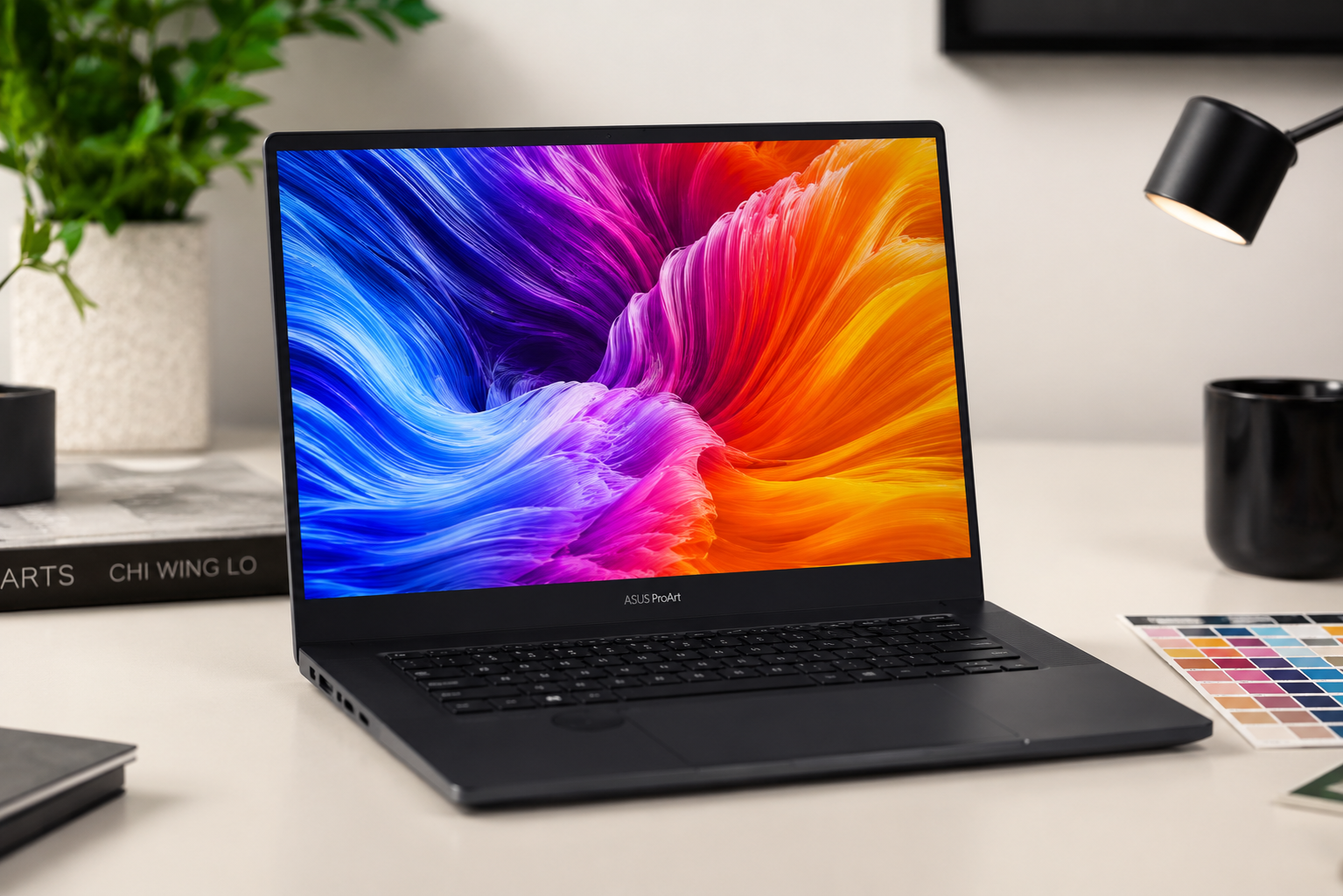
The ASUS ProArt P16 embodies understated professionalism in every dimension. According to official specifications, the chassis measures just 14.9 mm thick and weighs 1.95 kg — remarkably slim and light for a 16-inch laptop packing a 90Wh battery and discrete RTX 5090 graphics. The Nano Black aluminum finish resists fingerprints while projecting a mature aesthetic suitable for boardroom presentations and client meetings. The manufacturer claims MIL-STD-810H military-grade durability certification, ensuring the machine withstands the rigors of travel and field work. The inclusion of a ProArt Dial integrated into the touchpad area is a thoughtful creator-centric addition that provides intuitive control over brush sizes, timeline scrubbing, and color adjustments in supported applications.
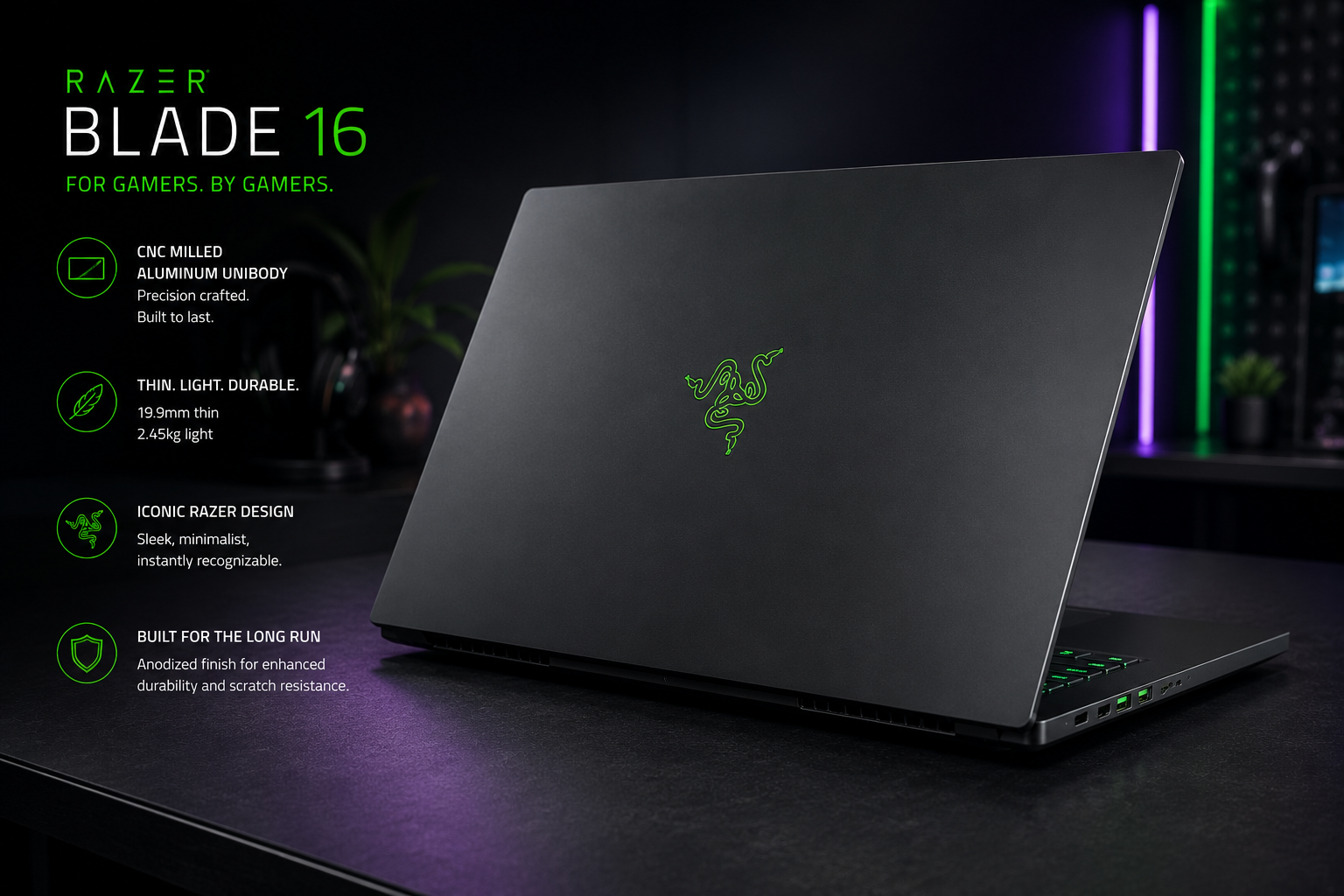
The Razer Blade 16 takes a different design approach, embracing the gaming pedigree that has defined the brand for over a decade. Per official claims, the CNC-milled aluminum unibody measures 19.9 mm thick and weighs 2.45 kg — noticeably heftier than the ASUS, though still impressively portable for a machine with RTX 4090-class graphics. The anodized black finish is iconic and instantly recognizable, while the green Razer logo on the lid glows with subtle sophistication. The per-key Razer Chroma RGB keyboard delivers 16.8 million color options and N-key rollover for competitive gaming. Build quality is exceptional, with the unibody construction eliminating panel flex and providing a solid, premium feel that justifies the higher price point.
Advantage — Design: The ASUS ProArt P16 wins for portability and professional aesthetics, being 5 mm thinner and 500 grams lighter than the Razer. The Razer Blade 16 takes the lead for build rigidity and gaming-oriented features like per-key RGB. For creators who travel frequently, the ASUS is the clear choice. For gamers who prioritize thermal headroom and keyboard customization, the Razer is superior.
Display Comparison
The display is where these two laptops diverge most dramatically, reflecting their target audiences. The ASUS ProArt P16 features a 16-inch 4K OLED touchscreen with a resolution of 3840 x 2400 pixels, delivering a pixel density of 283 ppi. According to official specifications, the panel covers 100% of the DCI-P3 color gamut, achieves VESA HDR True Black 500 certification, and offers a 1,000,000:1 contrast ratio with true blacks. The 120Hz refresh rate is smooth for creative work, while the touchscreen functionality with 4096-level pressure sensitivity transforms the laptop into a digital canvas when paired with the ASUS Pen. The Calman Verified factory calibration ensures Delta E less than 2 color accuracy out of the box — critical for photographers, videographers, and designers who demand color fidelity.
The Razer Blade 16 counters with a 16-inch QHD+ Mini-LED display at 2560 x 1600 resolution and a blazing 240Hz refresh rate. Per official claims, the panel covers 100% DCI-P3 and achieves VESA DisplayHDR 1000 certification with peak brightness reaching 1000 nits — significantly brighter than the ASUS OLED’s 600 nits. The Mini-LED backlighting with local dimming zones delivers impressive contrast for an LCD panel, though it cannot match the infinite contrast of OLED. The 240Hz refresh rate is a game-changer for competitive titles, providing buttery-smooth motion clarity that the 120Hz ASUS cannot match. However, the lack of touch support and stylus compatibility limits its utility for creative professionals.
Advantage — Display: The ASUS ProArt P16 wins for creators with its 4K OLED touchscreen, superior color accuracy, and stylus support. The Razer Blade 16 takes the lead for gamers with its 240Hz Mini-LED panel and higher HDR peak brightness. For content creation workflows, the ASUS is decisively superior. For fast-paced gaming, the Razer is the clear choice.
Performance — Ryzen AI 9 HX 370 vs Intel Core i9-13950HX
Based on the hardware configuration, both laptops deliver exceptional performance, but their strengths lie in different areas. The ASUS ProArt P16 is powered by the AMD Ryzen AI 9 HX 370, a 12-core, 24-thread processor built on Zen 5 architecture with a 4nm process. According to official specifications, it runs at up to 5.1 GHz with 36MB total cache and includes a dedicated NPU delivering 50 TOPS of AI performance — ideal for AI-accelerated creative workflows in Adobe Photoshop, Premiere Pro, and DaVinci Resolve. The NVIDIA GeForce RTX 5090 Laptop GPU with 24GB GDDR7 is NVIDIA Studio certified, ensuring optimized drivers and validated performance across professional applications. The 64GB LPDDR5X-7500MHz RAM is the fastest memory available in any laptop, providing ample bandwidth for 8K video editing and complex 3D rendering.
The Razer Blade 16 deploys the Intel Core i9-13950HX, a 24-core behemoth with 32 threads and a maximum turbo frequency of 5.5 GHz. Per official claims, this chip excels in both single-threaded and multi-threaded workloads, making it one of the most powerful mobile processors available in 2026. The NVIDIA GeForce RTX 4090 Laptop GPU with 16GB GDDR6 is the pinnacle of mobile gaming graphics, supporting DLSS 3.5, ray tracing, and frame generation for maximum fidelity at high resolutions. The vapor chamber cooling system maintains sustained performance during extended gaming sessions, though fan noise becomes noticeable under full load. The up to 64GB DDR5-5600 RAM and up to 4TB PCIe Gen 4 SSD provide exceptional multitasking and storage capabilities.
On paper, the Intel Core i9-13950HX outperforms the AMD Ryzen AI 9 HX 370 in raw multi-core benchmarks due to its higher core count, while the AMD chip holds advantages in AI workload efficiency and power consumption. The RTX 5090 in the ASUS features more VRAM and newer GDDR7 memory, benefiting professional workloads, while the RTX 4090 in the Razer delivers higher raw gaming frame rates thanks to its higher TDP envelope.
Advantage — Performance: The Razer Blade 16 wins for raw gaming performance and multi-core productivity. The ASUS ProArt P16 takes the lead for AI-accelerated creative workflows and memory-intensive professional applications. For gamers and streamers, the Razer is the superior choice. For video editors, 3D artists, and AI developers, the ASUS provides better value.
Battery Life & Connectivity
Battery life represents a critical differentiator for mobile professionals. The ASUS ProArt P16 houses a 90Wh battery that, according to the manufacturer, delivers up to 10-12 hours of mixed productivity use when leveraging the efficient AMD Ryzen AI 9 HX 370 and integrated Radeon 890M graphics for lighter tasks. The USB4 40Gbps ports support Power Delivery 3.0 for versatile charging, while the inclusion of an SD Express 7.0 card reader is a boon for photographers and videographers who need to transfer high-resolution RAW files quickly. The HDMI 2.1 port supports external 8K displays, and the audio jack completes a well-rounded connectivity suite.
The Razer Blade 16 carries a slightly larger 95.2Wh battery, but the power-hungry Intel Core i9 and RTX 4090 significantly reduce real-world endurance. Based on published data, users can expect 5-7 hours of light productivity and under 2 hours of intensive gaming on battery power. The Thunderbolt 4 ports offer 40Gbps data transfer, DisplayPort 1.4 output, and Power Delivery charging, while the UHS-II SD card reader supports faster memory card transfers than the ASUS. The inclusion of Wi-Fi 6E and Bluetooth 5.3 ensures cutting-edge wireless connectivity.
Advantage — Battery: The ASUS ProArt P16 wins with significantly better real-world endurance thanks to the efficient AMD platform. Advantage — Connectivity: The Razer Blade 16 offers Thunderbolt 4 and UHS-II SD, while the ASUS counters with SD Express 7.0 and superior creator-focused ports. For mobile creators, the ASUS is the better-connected machine. For users with Thunderbolt docks and external GPU aspirations, the Razer holds the edge.
Final Verdict — Which Should You Buy?
|
🏆 Buy ASUS ProArt P16 If
|
📋 Buy Razer Blade 16 If
|
For the Indian professional in 2026, the ASUS ProArt P16 is the definitive creator workstation. The combination of 4K OLED touchscreen, stylus support, NVIDIA Studio certification, and remarkable portability at 1.95 kg makes it an ideal companion for photographers, videographers, architects, and designers. At an estimated Rs.2,50,000-Rs.2,80,000, it undercuts the Razer while delivering superior value for creative workflows. The 64GB LPDDR5X-7500MHz RAM and 24GB GDDR7 VRAM ensure the machine handles 8K video timelines, complex 3D scenes, and AI inference tasks without breaking a sweat. The MIL-STD-810H durability and professional aesthetic make it equally at home in a studio or a corporate boardroom.
The Razer Blade 16, priced at approximately Rs.3,50,000-Rs.4,00,000+, is the undisputed gaming champion. The Intel Core i9-13950HX and RTX 4090 Laptop GPU deliver frame rates that rival desktop gaming PCs, while the 240Hz Mini-LED display provides the competitive edge that esports enthusiasts demand. The CNC aluminum unibody, per-key Chroma RGB, and vapor chamber cooling reflect Razer’s decades of gaming heritage. However, the higher price, heavier chassis, and shorter battery life make it a less practical choice for professionals who need all-day productivity away from a power outlet. For pure gaming performance and build quality, the Razer justifies its premium — but creators will find the ASUS ProArt P16 the more versatile and cost-effective investment.
|
ASUS ProArt P16 9.1 / 10 Best Creator Workstation |
Razer Blade 16 8.8 / 10 Best Gaming Powerhouse |
| 🛒 Buy ASUS ProArt P16 | 🛒 Buy Razer Blade 16 |
📄 Also Read: Best Laptops for Video Editing in India 2026 — Complete buying guide for content creators and filmmakers.
📄 Also Read: Razer Blade 16 Full Review — In-depth analysis of Razer’s flagship gaming laptop.
Affiliate Disclosure: This post contains affiliate links. If you purchase through these links, we may earn a small commission at no extra cost to you.
Content Disclosure: This content was produced with AI assistance and human review to ensure accuracy, fairness, and helpfulness for our readers.