
- ASUS Vivobook S16 Review 2026: Intel Core 5-210H, 16″ 144Hz Display, Price & Verdict
- ASUS Vivobook S16 Design — Metallic Finish & MIL-STD-810H Durability
- Display — 16-inch FHD+ 144Hz IPS with 16:10 Aspect Ratio
- Performance — Intel Core 5-210H with Intel UHD Graphics
- Keyboard & Touchpad — Backlit Chiclet with Num Pad & Precision Touchpad
- Ports & Connectivity — USB-C with DisplayPort, HDMI 1.4 & Wi-Fi 6
- Battery Life — 70Wh with 65W USB-C Fast Charging
- ASUS Vivobook S16 Full Specifications
- Pros & Cons
- Who Should Buy the ASUS Vivobook S16?
- Who Should NOT Buy the ASUS Vivobook S16?
- Final Verdict — Is the ASUS Vivobook S16 Worth Buying?
Laptops | Review | 2026
ASUS Vivobook S16 Review 2026: Intel Core 5-210H, 16″ 144Hz Display, Price & Verdict
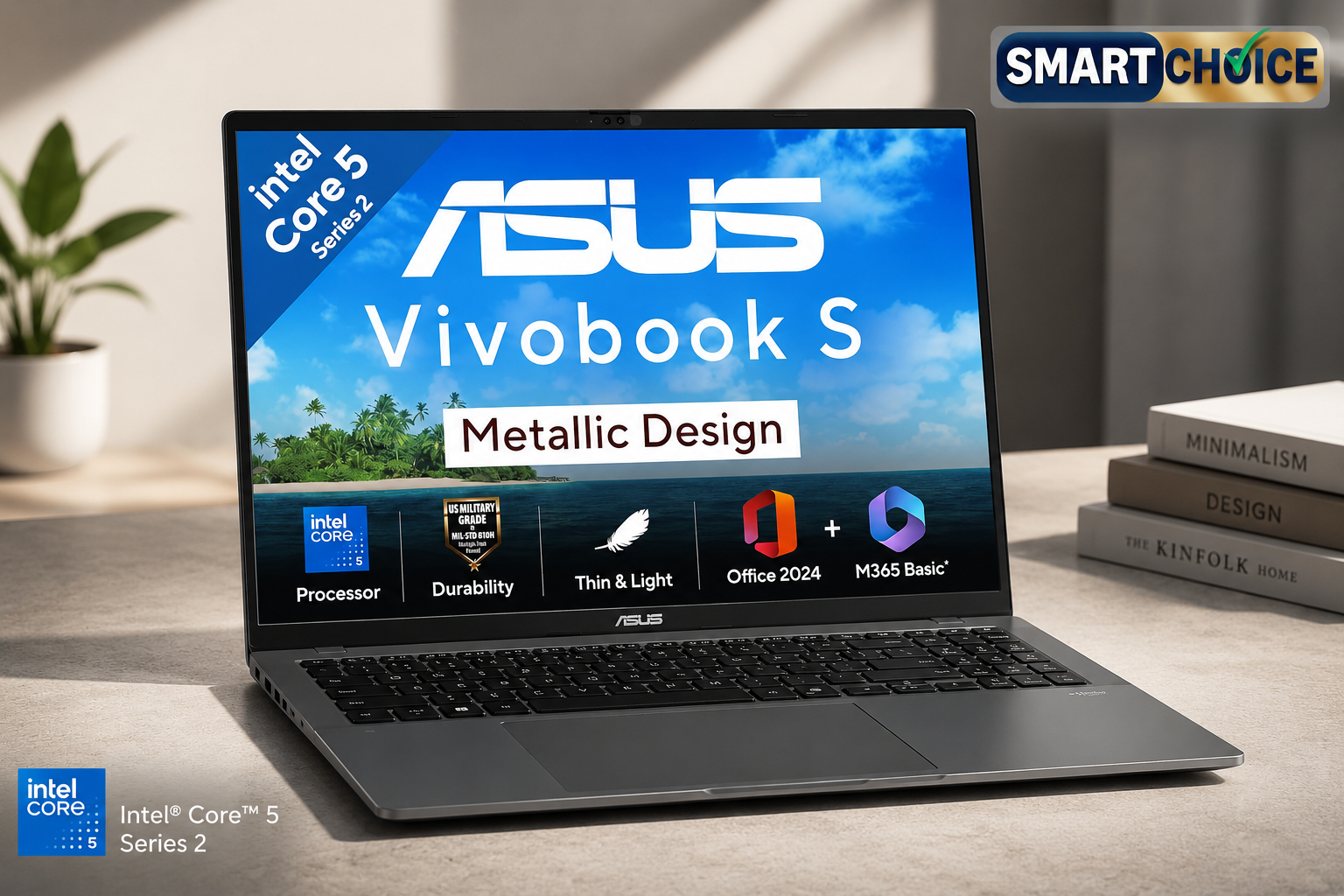
The ASUS Vivobook S16 S3607VA-RP113WS enters India’s laptop market in 2026 as a compelling thin-and-light option for students, professionals, and everyday users seeking a large-screen experience without the bulk of traditional 16-inch notebooks. Priced at approximately ₹67,990 on the ASUS India store and ₹68,990 at major retailers, this Metallic Gray machine pairs a 14th Gen Intel Core 5-210H processor with a 16-inch FHD+ 144Hz IPS display, 16GB of DDR5 RAM, and a 512GB PCIe Gen4 SSD. According to the manufacturer, the Vivobook S16 is designed to deliver smooth everyday performance for work, study, and entertainment while maintaining a remarkably portable 1.7 kg chassis.
What sets the Vivobook S16 apart in the crowded thin-and-light segment is its combination of a high-refresh-rate 16:10 display, military-grade durability certification, and a generous software bundle that includes Office Home 2024 with lifetime validity and Microsoft 365 Basic with 100GB cloud storage for one year. The company claims the 70Wh battery provides up to 20 hours of usage, while the 144Hz panel ensures smoother scrolling and more responsive interactions compared to standard 60Hz alternatives. On paper, these specifications position the Vivobook S16 as a versatile daily driver for users who value screen real estate and portability in equal measure.
The laptop market in India around the ₹65,000 to ₹75,000 price bracket has become fiercely competitive in 2026. ASUS faces strong competition from the HP Victus series, Lenovo IdeaPad Slim lineup, and Acer Aspire range, all of which offer compelling alternatives with varying strengths. However, the Vivobook S16 differentiates itself through its larger 16-inch display with a taller 16:10 aspect ratio, which provides more vertical space for productivity tasks compared to the more common 16:9 panels. According to the manufacturer, this aspect ratio is particularly beneficial for document editing, spreadsheet work, and web browsing where vertical scrolling is frequent.

ASUS Vivobook S16 Design — Metallic Finish & MIL-STD-810H Durability
The ASUS Vivobook S16 features a modern metallic design that the company claims balances aesthetics with practicality. Measuring 357 x 250.6 x 17.9 mm and weighing 1.7 kg, the chassis is remarkably compact for a 16-inch laptop. According to the manufacturer, the top case uses a premium plastic material with a metallic finish that resists fingerprints while maintaining a professional appearance. The Matte Gray colour option provides a neutral, understated look that suits both office environments and casual settings.
The build quality is reinforced by US MIL-STD-810H military-grade certification, which the company claims ensures reliability under demanding conditions. According to ASUS, the laptop undergoes rigorous testing including high temperature, low temperature, shock, vibration, and altitude tests. While this certification does not make the device indestructible, it does indicate a higher level of durability than typical consumer laptops. The company states that these testing standards contribute to the laptop’s longevity and sustainability, making it a reliable companion for daily commuting and travel.
The 17.9 mm thickness is competitive for a 16-inch device, though not the slimmest in the segment. The company claims the chassis design incorporates strategically placed ventilation grilles that work in conjunction with the internal cooling system to maintain optimal temperatures. The hinge mechanism allows the display to open smoothly to approximately 180 degrees, which the manufacturer suggests is useful for collaborative work and presentations where screen sharing is required.
The overall design philosophy emphasises minimalism and functionality. The ASUS Vivobook branding on the lid is subtle, using a clean sans-serif typeface that does not distract from the professional aesthetic. According to the manufacturer, the chassis edges are slightly rounded to improve comfort when carrying the laptop and to prevent snagging when sliding it into bags. The bottom panel features rubber feet that elevate the device slightly for improved airflow and stability on flat surfaces.
At 1.7 kg, the Vivobook S16 is lighter than many 15.6-inch and 16-inch competitors that often exceed 2 kg. The company claims this weight reduction is achieved through careful material selection and internal component layout without compromising structural integrity. For users who frequently travel with their laptops or carry them between classes and offices, the reduced weight should translate to noticeably less fatigue during extended carrying sessions.

Display — 16-inch FHD+ 144Hz IPS with 16:10 Aspect Ratio
The display is arguably the standout feature of the ASUS Vivobook S16. The 16-inch IPS-level panel offers a resolution of 1920 x 1200 pixels (WUXGA) with a 16:10 aspect ratio, providing approximately 11% more vertical screen real estate compared to traditional 16:9 displays. According to the manufacturer, this taller aspect ratio is ideal for productivity tasks such as document editing, coding, and web browsing where vertical content is abundant. The 144Hz refresh rate is a significant advantage at this price point, delivering smoother scrolling, reduced motion blur, and more responsive cursor movement.
The company claims the display reaches 300 nits of brightness, which should be adequate for indoor use and moderately bright environments. The anti-glare coating reduces reflections from overhead lighting and windows, improving visibility in office settings and classrooms. The 89% screen-to-body ratio is achieved through slim bezels on three sides, with a slightly thicker chin housing the ASUS logo. According to the manufacturer, the narrow bezels create a more immersive viewing experience for media consumption and video calls.
The 45% NTSC colour gamut coverage is modest and indicates this is not a display targeted at creative professionals who require accurate colour reproduction. The company claims the panel is suitable for everyday tasks, streaming, and casual photo editing, but users working with colour-critical applications may find the limited gamut restrictive. The low blue light hardware certification suggests reduced eye strain during extended usage sessions, which the manufacturer claims is particularly beneficial for students and professionals who spend long hours in front of the screen.
The 144Hz refresh rate deserves special mention. While high refresh rates are commonly associated with gaming laptops, the company claims the benefits extend to everyday productivity. Scrolling through long documents, switching between browser tabs, and navigating the Windows interface all feel noticeably smoother at 144Hz compared to 60Hz. The panel supports adaptive refresh rate technology that can dynamically adjust between different frequencies to balance smoothness and battery life.
At approximately 141 pixels per inch, the display density is sufficient for comfortable text rendering at normal viewing distances. The company claims the 16:10 aspect ratio reduces the need for vertical scrolling when reading articles, working with spreadsheets, and reviewing documents. For programmers and writers, the additional vertical space can accommodate more lines of code or text without requiring font size reduction.
The display hinge allows the panel to lay flat at 180 degrees, which the manufacturer suggests is useful for sharing content with colleagues or classmates. The company claims the IPS technology ensures consistent colours and viewing angles up to 178 degrees, making the screen readable from various positions. However, the 300-nit brightness may struggle under direct sunlight, so outdoor usage could be challenging.
Performance — Intel Core 5-210H with Intel UHD Graphics
The ASUS Vivobook S16 is powered by the Intel Core 5 Processor 210H, a 14th Gen chip built on Intel’s Raptor Lake architecture. According to the manufacturer, this processor features 8 cores and 12 threads arranged in a hybrid configuration with 4 Performance cores clocked at up to 4.8 GHz and 4 Efficient cores running at up to 3.6 GHz. The 12MB Intel Smart Cache helps reduce latency during task switching, while the processor’s 45W TDP provides sustained performance under load.
The company claims the Core 5-210H delivers up to 1.4x faster performance compared to previous generation processors in similar segments. Benchmark data from ASUS suggests PCMark 10 scores of up to 6,452, Cinebench R23 multi-core scores of up to 7,985, and Geekbench 6 multi-core scores of up to 6,543. On paper, these figures indicate solid performance for everyday productivity tasks, light content creation, and multitasking scenarios involving multiple browser tabs, office applications, and streaming.
The integrated Intel UHD Graphics handles display output and light graphical workloads. According to the manufacturer, this iGPU is capable of driving the internal 16-inch display at 144Hz and external monitors via the HDMI 1.4 and USB-C DisplayPort outputs. However, it is important to note that the UHD Graphics is not designed for gaming or GPU-intensive creative work. Users hoping to play modern titles or edit 4K video will find the integrated graphics significantly limiting.
The 16GB DDR5 RAM configuration uses a dual-channel setup with 8GB soldered to the motherboard and 8GB installed in a SO-DIMM slot. According to the manufacturer, this configuration is expandable up to 24GB by replacing the SO-DIMM module with a 16GB stick. The DDR5 memory operates at higher speeds than DDR4, providing improved bandwidth for memory-intensive tasks. The company claims this RAM capacity is sufficient for running multiple applications simultaneously, including web browsers with numerous tabs, office suites, and communication tools.
Storage is handled by a 512GB M.2 NVMe PCIe 4.0 SSD. According to the manufacturer, the PCIe 4.0 interface delivers significantly faster read and write speeds compared to SATA SSDs and older PCIe 3.0 drives. The company claims this translates to faster boot times, quicker application launches, and reduced file transfer durations. An additional M.2 2280 PCIe 4.0 x4 slot is available for storage expansion, allowing users to add a second SSD without replacing the primary drive.
The 512GB capacity should be adequate for most users, though heavy media consumers and professionals working with large files may need to utilise the expansion slot or cloud storage. The included Microsoft 365 Basic subscription provides 100GB of OneDrive cloud storage for one year, which the company claims offers a convenient solution for document backup and cross-device synchronisation.

Keyboard & Touchpad — Backlit Chiclet with Num Pad & Precision Touchpad
The ASUS Vivobook S16 features a full-size backlit chiclet keyboard with a dedicated number pad, a feature the company claims is increasingly rare in thin-and-light laptops. The backlit keys offer three brightness levels that can be adjusted to suit ambient lighting conditions. According to the manufacturer, the keyboard provides 1.4 mm of key travel, which strikes a balance between tactile feedback and slim chassis requirements. The chiclet-style keys have a matte finish that resists fingerprints and provides a comfortable typing surface.
The inclusion of a number pad is particularly valuable for students, accountants, and data entry professionals who frequently work with numerical data. The company claims the number pad keys are full-size and positioned in a standard layout, eliminating the learning curve associated with compact or non-standard arrangements. The arrow keys are slightly compressed to accommodate the number pad, which may require adjustment for users accustomed to larger directional keys.
The precision touchpad is enlarged to match the 16:10 display aspect ratio, providing additional vertical space for gestures. According to the manufacturer, the touchpad supports Windows Precision drivers and multi-finger gestures including two-finger scrolling, three-finger task switching, and four-finger desktop overview. The company claims the larger surface area reduces the need for repeated swipes when navigating long documents or web pages.
The touchpad surface is smooth and responsive, with satisfying click feedback. The company claims the palm rejection technology prevents accidental cursor movement when typing, a common issue with large touchpads. The touchpad is positioned centrally below the keyboard, aligned with the main typing area rather than the full chassis width, which the manufacturer suggests provides a more natural hand position during typing.
Audio is handled by built-in speakers with ASUS Audio Booster technology. The company claims the speakers deliver clear vocals and decent volume for video calls and media consumption. However, the thin chassis limits bass response, so music enthusiasts may prefer external speakers or headphones. The 3.5mm audio combo jack supports both headphones and microphones, and the built-in array microphone provides noise cancellation for clearer voice capture during video conferences.
The keyboard backlighting is white and evenly distributed across all keys. According to the manufacturer, the backlight automatically adjusts based on ambient light sensor readings, though manual control is also available through function key combinations. The company claims the backlighting is bright enough for comfortable typing in dimly lit environments while remaining subtle enough to avoid distraction in dark rooms.

Ports & Connectivity — USB-C with DisplayPort, HDMI 1.4 & Wi-Fi 6
The ASUS Vivobook S16 offers a comprehensive selection of ports that the company claims eliminates the need for most dongles and adapters. The left side houses two USB 3.2 Gen 1 Type-A ports, while the right side features two USB 3.2 Gen 1 Type-C ports with DisplayPort 1.2 and Power Delivery 3.0 support, one HDMI 1.4 port, and a 3.5mm audio combo jack. According to the manufacturer, this arrangement provides flexibility for connecting external displays, storage devices, and peripherals without requiring additional hubs.
The USB-C ports support data transfer speeds up to 5Gbps, DisplayPort video output, and power delivery for charging the laptop. According to the manufacturer, the Power Delivery 3.0 support allows the laptop to charge from compatible USB-C power banks and chargers, providing flexibility for users who travel frequently. The company claims the 65W USB-C adapter included in the box can charge the battery to 60% in approximately 49 minutes.
The HDMI 1.4 port supports external monitors up to 4K resolution at 30Hz, which the company claims is sufficient for most productivity setups involving external displays. However, users requiring 4K at 60Hz or higher refresh rates will need to use the USB-C DisplayPort output, which supports higher bandwidth. The company claims the dual display output capability allows users to connect two external monitors simultaneously for expanded workspace.
Wireless connectivity includes Wi-Fi 6 (802.11ax) and Bluetooth 5.3. According to the manufacturer, Wi-Fi 6 provides faster speeds, lower latency, and improved performance in congested network environments compared to Wi-Fi 5. The dual-band 2×2 MIMO configuration supports both 2.4GHz and 5GHz networks. The company claims Bluetooth 5.3 offers improved stability and range for wireless peripherals such as mice, keyboards, and headphones.
The absence of an Ethernet port is expected for a thin-and-light laptop, though users requiring wired network connectivity will need a USB-C to Ethernet adapter. The company claims the Wi-Fi 6 performance is sufficient for most business and home networking scenarios, with theoretical maximum speeds exceeding what most Indian broadband connections currently offer.
Security features include an FHD IR webcam with Windows Hello facial recognition support and a physical privacy shutter. According to the manufacturer, the IR camera enables fast and secure login without passwords, while the privacy shutter provides peace of mind against unauthorised camera access. The laptop also includes a firmware-based Trusted Platform Module (TPM) for hardware-level security and McAfee antivirus with a one-year subscription.

Battery Life — 70Wh with 65W USB-C Fast Charging
The 70Wh battery is a generous capacity for a thin-and-light laptop in this price segment. According to the manufacturer, the battery delivers up to 20 hours of usage on a single charge under optimal conditions. The company claims this endurance is achieved through a combination of the efficient Intel Core 5-210H processor, the 70Wh battery capacity, and software optimisations in MyASUS that manage power consumption based on usage patterns.
The 65W USB-C power adapter supports fast charging technology that the company claims can restore 60% of battery capacity in approximately 49 minutes. This is particularly useful for users who need quick top-ups between meetings or classes. The USB-C charging port also accepts power from compatible third-party chargers and power banks, providing flexibility when the original adapter is unavailable.
According to the manufacturer, the battery lifespan is extended by 1.2x compared to standard lithium-ion cells through intelligent charging algorithms that prevent overcharging and reduce heat generation. The MyASUS software includes battery health management features that allow users to set charging limits, which the company claims helps preserve long-term battery capacity for users who primarily operate the laptop while plugged in.
Real-world battery life will vary significantly based on usage patterns. The company claims the 20-hour figure is achieved under light productivity conditions with reduced screen brightness and background applications minimised. Users engaging in video streaming, video calls, or processor-intensive tasks should expect shorter endurance. Based on the hardware configuration, typical mixed usage should yield between 8 and 12 hours of battery life, which remains competitive for a 16-inch laptop.
The battery is non-removable, which is standard for modern thin-and-light designs. The company claims the 4-cell Li-ion configuration is optimised for energy density and longevity. For users concerned about long-term battery health, ASUS offers extended warranty options that include battery coverage at additional cost.
ASUS Vivobook S16 Full Specifications
| Specification | Details |
| Display | 16″ IPS-level, 1920 x 1200 (WUXGA), 144Hz, 300 nits, 16:10, Anti-glare, 45% NTSC, 89% screen-to-body |
| Processor | Intel Core 5-210H (14th Gen), 8 cores (4P+4E), 12 threads, up to 4.8 GHz, 12MB cache, 45W TDP |
| Graphics | Intel UHD Graphics (integrated) |
| RAM | 16GB DDR5 (8GB onboard + 8GB SO-DIMM), expandable up to 24GB |
| Storage | 512GB M.2 NVMe PCIe 4.0 SSD, 1x additional M.2 2280 PCIe 4.0 x4 slot |
| OS | Windows 11 Home (64-bit) |
| Software | Office Home 2024 (lifetime) + Microsoft 365 Basic (1 year, 100GB cloud) + McAfee (1 year) |
| Webcam | FHD with IR (Windows Hello), physical privacy shutter |
| Keyboard | Backlit chiclet with number pad, 1.4mm travel, black keys |
| Touchpad | Precision touchpad, 16:10 aspect ratio matching display |
| Audio | Built-in speakers with ASUS Audio Booster, built-in array microphone, 3.5mm combo jack |
| Ports | 2x USB 3.2 Gen 1 Type-A, 2x USB 3.2 Gen 1 Type-C (DP 1.2 + PD 3.0), 1x HDMI 1.4, 1x 3.5mm audio |
| Connectivity | Wi-Fi 6 (802.11ax) dual-band 2×2, Bluetooth 5.3 |
| Security | Windows Hello (IR camera), firmware TPM, BIOS password, McAfee 1 year |
| Battery | 70Wh 4-cell Li-ion, up to 20 hours claimed, 65W USB-C adapter, 60% in 49 mins fast charge |
| Build | Metallic finish plastic top case, MIL-STD-810H certified |
| Dimensions | 357 x 250.6 x 17.9 mm, 1.7 kg |
| Colour | Matte Gray |
| India Price | ₹67,990 (ASUS Store) / ₹68,990 (Retail) / MRP ₹85,990 |
Pros & Cons
|
✅ Pros
|
❌ Cons
|
Who Should Buy the ASUS Vivobook S16?
The ASUS Vivobook S16 is ideally suited for students and working professionals who need a large-screen laptop for productivity tasks without sacrificing portability. The 16-inch 16:10 display provides ample space for multitasking with multiple windows side by side, while the 1.7 kg weight ensures the laptop remains manageable for daily commuting. According to the manufacturer, the included Office Home 2024 and Microsoft 365 Basic subscription make this an excellent choice for students who require word processing, spreadsheet, and presentation software throughout their academic journey.
Business users and remote workers will appreciate the full-size backlit keyboard with number pad, the FHD IR webcam with Windows Hello for secure video conferencing, and the MIL-STD-810H durability certification that provides peace of mind during travel. The company claims the 70Wh battery supports full working days away from power outlets, while the fast charging capability ensures quick top-ups between meetings. The Wi-Fi 6 connectivity provides reliable wireless performance in office environments with multiple connected devices.
Content consumers and casual users who prioritise screen size for streaming, browsing, and social media will find the 16-inch 144Hz panel delivers a noticeably smoother and more immersive experience than smaller alternatives. The anti-glare coating and 300-nit brightness are adequate for indoor viewing, while the built-in speakers with ASUS Audio Booster provide decent audio for movies and video calls. The company claims the large touchpad and comfortable keyboard make extended browsing sessions more enjoyable.
Users upgrading from older 15.6-inch laptops will appreciate the larger screen in a similarly weighted chassis. The company claims the transition to a 16-inch 16:10 display feels like a significant upgrade without the portability penalty typically associated with larger laptops. The PCIe 4.0 SSD ensures faster boot and application load times compared to older SATA or HDD-equipped machines, while the DDR5 memory provides improved responsiveness for modern applications.
Who Should NOT Buy the ASUS Vivobook S16?
The ASUS Vivobook S16 is not recommended for gamers or creative professionals who require dedicated graphics performance. The Intel UHD integrated graphics are simply not capable of running modern AAA titles at playable frame rates or handling GPU-intensive tasks like 3D rendering, video editing, and CAD work. Users seeking gaming performance should consider alternatives like the ASUS TUF Gaming A15 or Lenovo Legion 5i, both of which offer dedicated NVIDIA GPUs at higher price points.
Photo and video editors who require colour-accurate displays should look elsewhere. The 45% NTSC colour gamut coverage is insufficient for professional colour grading and photo retouching where accurate colour reproduction is essential. Creatives should consider laptops with 100% sRGB or DCI-P3 coverage, such as the MacBook Pro 14 M3 Pro or Dell XPS 15, which offer significantly better colour accuracy and dedicated graphics for creative workflows.
Users requiring 4K external monitor support at 60Hz will find the HDMI 1.4 port limiting, as it only supports 4K at 30Hz. While the USB-C DisplayPort output can drive higher resolutions and refresh rates, users with existing 4K monitor setups may need adapters or cable replacements. Those working with multiple high-resolution external displays should consider laptops with Thunderbolt 4 or HDMI 2.1 for maximum flexibility.
Buyers seeking premium build materials may be disappointed by the plastic construction despite the metallic finish. While the MIL-STD-810H certification ensures durability, the chassis does not offer the same premium feel as aluminium or magnesium alloy laptops in higher price brackets. Users prioritising build quality over specifications should consider the MSI Prestige 14 AI Evo or Razer Blade 16, though these come at significantly higher prices.
Programmers and developers running virtual machines or containerised environments may find the 16GB RAM ceiling limiting. While 24GB is possible with expansion, the soldered 8GB module means dual-channel performance is not optimal with asymmetric configurations. Developers requiring 32GB or more RAM should consider laptops with fully expandable memory or higher base configurations.
📄 Also Read: Top 10 Laptops for Engineering Students 2026 — Complete buying guide with detailed reviews for students and professionals seeking the best laptops for academic and professional use.
📄 Also Read: ASUS TUF Gaming A15 FA566 Review 2026 — A gaming-focused alternative with dedicated NVIDIA graphics for users who need GPU performance.
📄 Also Read: HP Victus 16 r0013dx Review 2026 — Another large-screen option with dedicated graphics for creative work and light gaming.
Final Verdict — Is the ASUS Vivobook S16 Worth Buying?
The ASUS Vivobook S16 S3607VA-RP113WS delivers exceptional value for buyers seeking a large-screen thin-and-light laptop under ₹70,000 in India. The combination of a 16-inch 144Hz 16:10 display, 16GB DDR5 RAM, 512GB PCIe 4.0 SSD, and a generous software bundle including Office Home 2024 creates a compelling package for students, professionals, and everyday users. According to the manufacturer, the 70Wh battery, MIL-STD-810H durability, and 1.7 kg weight further strengthen its position as a versatile daily driver.
The laptop’s greatest strength is its display. The 16-inch 16:10 panel with 144Hz refresh rate is genuinely rare at this price point and provides tangible benefits for productivity and general usage. The taller aspect ratio reduces scrolling in documents and web pages, while the high refresh rate makes the Windows interface feel noticeably more responsive. For users who spend hours reading, writing, and browsing, these display characteristics translate to real comfort improvements.
However, the compromises are clear and significant for certain users. The Intel UHD Graphics eliminate any serious gaming or creative workload capability, the 45% NTSC gamut restricts colour-accurate work, and the plastic build lacks the premium feel of metal chassis alternatives. According to the manufacturer, the Vivobook S16 knows its audience and does not attempt to be everything for everyone. Instead, it focuses on delivering an excellent productivity experience at a competitive price.
For the target audience of students, office workers, and general users who prioritise screen real estate, portability, and battery life over graphics performance, the ASUS Vivobook S16 is a strong recommendation. The frequent discounts that bring the price closer to ₹65,000 make it even more attractive. For gamers, creators, and power users, alternatives with dedicated GPUs and better displays remain the wiser choice despite the higher cost.
Our Rating
8.0 / 10
Excellent Productivity Laptop with a Stunning Display
🛒 Buy ASUS Vivobook S16 on Amazon
Also check official specs at ASUS India Official Website
Affiliate Disclosure: This post contains affiliate links. If you purchase through these links, we may earn a small commission at no extra cost to you.
Content Disclosure: This content was produced with AI assistance and human review to ensure accuracy, fairness, and helpfulness for our readers.